


Payroll UK: Meaning, Process & How to Pay Employees
Payroll is the process employers use to calculate employee pay, make deductions, report payroll information to HMRC, and pay employees. UK employers normally operate payroll through the Pay As You Earn (PAYE) system. Running payroll involves more than transferring salaries. Employers need to calculate gross pay, deduct Income Tax and National Insurance, account for pension contributions and other deductions, issue payslips and report payroll information through Real Time Information (RTI).
Payroll also creates financial records that support bookkeeping, accounting, employment administration and tax compliance. This guide explains what payroll means, how it works, how to calculate employee pay, what employers report to HMRC and how to pay employees correctly.
What Is Payroll?
Payroll is the process of calculating, recording, reporting and paying employee wages and employment-related deductions.For each pay period, an employer determines what an employee has earned, calculates the required deductions and establishes the final amount payable.
It can include:
- basic salary or hourly wages
- overtime
- bonuses and commission
- holiday pay
- statutory payments
- PAYE Income Tax
- employee National Insurance
- employer National Insurance
- workplace pension contributions
- student and postgraduate loan deductions
- attachment of earnings deductions
- other authorised deductions
- gross pay
- net pay
- payslips
- HMRC payroll submissions
UK employers normally use payroll software to perform calculations, maintain records and report PAYE information to HMRC.
What Is Payroll Processing?
Payroll processing is the workflow that converts employee pay information into calculated wages, deductions, HMRC reports and employee payments. The process starts with employee and pay data. It finishes when the correct amounts have been calculated, reported, and paid to employees, HMRC and other relevant organisations. Accurate processing also creates a record showing how each employee’s pay and deductions were calculated.
What Is a Payroll Number?
A payroll number is a unique reference used to identify an employee within an employer’s payroll system.It may also be called an employee number or ID. Employers can use payroll numbers to distinguish between employees, organise payroll records and reduce identification errors. A different payroll ID should be used where an employee has more than one employment under the same PAYE scheme. Employers should also avoid incorrectly reusing an old payroll ID because this can create duplicate employment records. A payroll number may appear on a payslip or internal payroll record, but it is not a universal statutory requirement for every UK payslip.
How Does Payroll Work in the UK?
UK payroll follows a structured process that ensures employees are paid correctly, and employers meet their HMRC reporting and payment obligations. Each payroll cycle involves recording employee earnings, calculating statutory and other deductions, reporting information through Real Time Information (RTI), issuing payslips and paying employees. Employers must also calculate their own liabilities and maintain accurate payroll records
A normal payroll cycle follows these stages:
- Collect employee information. Obtain the details required to create the employee’s payroll record.
- Record employee earnings. Enter salary, hours, overtime, bonuses, commission, holiday pay and other relevant payments.
- Calculate gross pay. Determine total earnings before deductions.
- Calculate deductions. Apply PAYE Income Tax, National Insurance and other relevant deductions.
- Calculate employer liabilities. Determine employer National Insurance and other employer payroll costs.
- Calculate net pay. Subtract employee deductions from gross pay.
- Produce the payslip. Give the employee an itemised payslip on or before payday.
- Report payroll to HMRC. Submit the required payroll information through RTI.
- Pay the employee. Transfer net pay on the agreed payday.
- Pay HMRC and retain records. Settle the PAYE liability by the relevant deadline and maintain supporting records.
This cycle may operate weekly, fortnightly, four-weekly or monthly according to the employer’s agreed pay schedule.
What Must You Do Before Running Payroll?
An employer should establish its PAYE scheme, employee records, software, pension arrangements and payment schedule before processing payroll. Correct setup helps reduce tax-code errors, duplicate employee records, incorrect deductions and late HMRC submissions.
Do You Need to Register as an Employer With HMRC?
You normally need to register with HMRC as an employer before your first payday if you employ staff and operate PAYE. This can also apply where a limited company pays its director through payroll. HMRC normally allows an employer to register up to 2 months before it starts paying employees. After registration, HMRC provides employer references that are used for PAYE reporting and payments.
What Employee Information Do You Need for Payroll?
Before processing payroll, employers must collect the information needed to calculate pay, apply the correct tax treatment and meet HMRC reporting requirements. Accurate employee details help prevent errors, incorrect deductions and delays in reporting. Employers should confirm personal details, employment terms, tax information, National Insurance details and any relevant student loan or workplace pension information before the first payroll run.
Relevant employee information can include:
- full name
- residential address
- date of birth
- start date
- National Insurance number
- P45 information
- tax code
- starter declaration
- student or postgraduate loan status
- agreed salary or hourly rate
- normal working hours
- pension information
A new employee will normally provide relevant tax information through a P45. Where an appropriate P45 is unavailable, the employee may need to provide information through HMRC’s Starter Checklist. Employers also need the employee’s agreed payment information, such as the bank account used for salary payments where wages are paid by bank transfer. The distinction is important: tax information determines how payroll is calculated and reported, while payment information determines how the resulting net wage reaches the employee.
Do You Need Payroll Software?
Payroll software helps employers calculate employee pay accurately and meet their PAYE reporting obligations. The right system can automate payroll calculations, reduce manual errors and support timely submissions to HMRC. Employers should use software that matches their workforce size, payment arrangements and payroll requirements, while ensuring it can handle all relevant deductions, reporting obligations and employee payroll records efficiently.
Payroll software can help employers:
- calculate gross pay
- calculate PAYE Income Tax
- calculate National Insurance
- process pension deductions
- calculate student loan deductions
- produce payslips
- maintain payroll records
- submit RTI reports
- prepare year-end payroll information
Employers should choose software that supports the functions their workforce and pay structure require. HMRC also provides Basic PAYE Tools for employers with fewer than 10 employees. It is free but provides fewer functions than many commercial payroll systems.
What Workplace Pension Duties Apply?
Employers must assess their workforce for workplace pension automatic enrolment and enrol workers who meet the relevant conditions.
Automatic enrolment generally applies where a worker:
- is aged from 22 to State Pension age
- earns at least £10,000 a year
- normally works in the UK
The employer must also make the required employer pension contribution where the rules apply. It must therefore process employee pension deductions accurately and maintain information that supports the employer’s pension duties.
How Do You Calculate Payroll?
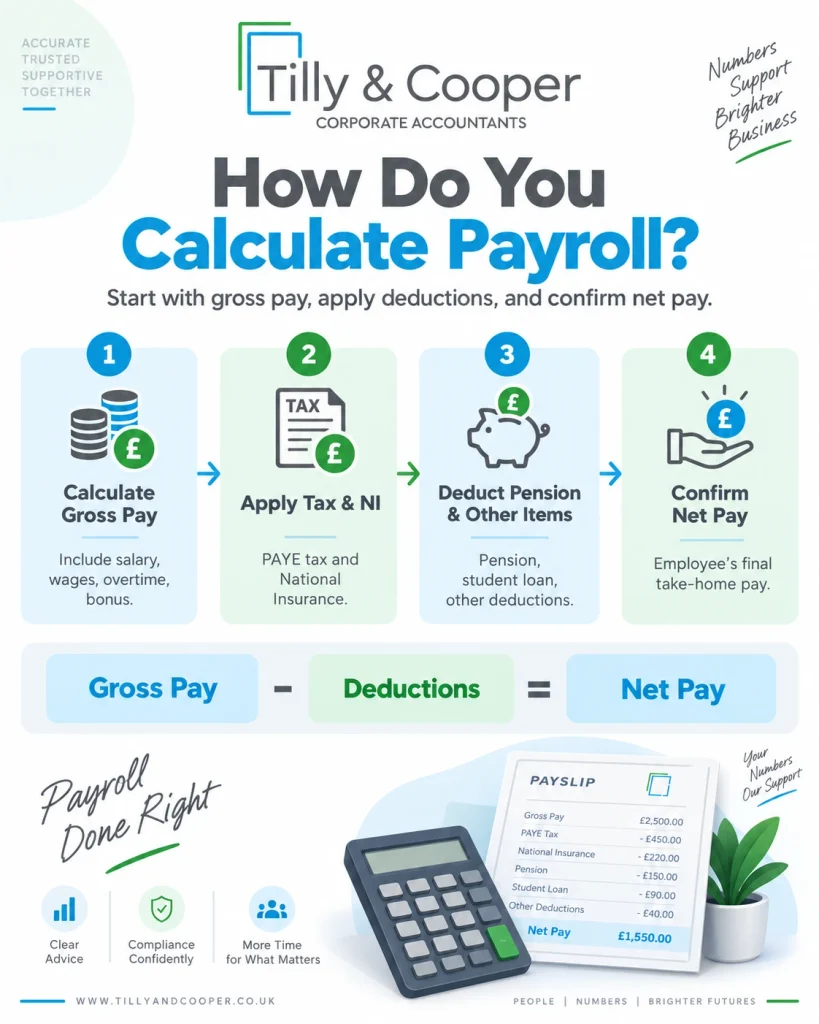
Payroll is calculated by determining gross pay, applying the correct statutory and authorised deductions and calculating the resulting net pay.
The basic formula is:
Net pay = Gross pay − employee deductions
Employer costs, such as employer National Insurance, are calculated separately. They do not normally reduce the employee’s agreed gross salary.
Step 1: Calculate Gross Pay
Gross pay is the employee’s total earnings before it deductions.
Depending on the employee’s contract and work during the pay period, gross pay can include:
- basic salary
- hourly wages
- overtime
- bonuses
- commission
- holiday pay
- shift allowances
- statutory payments
- other taxable employment payments
Employers should check timesheets, overtime approvals, commission records and other variable information before finalising gross pay.
Step 2: Calculate PAYE Income Tax
PAYE Income Tax is calculated using the employee’s taxable pay, tax code and relevant PAYE rules.
Payroll software normally performs the calculation for each pay period. For the 2026/27 tax year, the standard Personal Allowance is £12,570. However, employers should not assume every employee receives the full allowance.
The actual deduction can depend on:
- the employee’s tax code
- taxable earnings
- pay frequency
- previous taxable pay
- previous tax deducted
- whether the tax code operates cumulatively
- whether Scottish Income Tax rates apply
Employers should therefore use the tax code provided through the appropriate HMRC or starter process.
Step 3: Calculate National Insurance
Employee and employer National Insurance are calculated separately using the employee’s earnings and National Insurance category.
For most employees using National Insurance Category A in 2026/27:
| Earnings | Employee National Insurance |
| Up to the Primary Threshold | 0% |
| Above the Primary Threshold to the Upper Earnings Limit | 8% |
| Above the Upper Earnings Limit | 2% |
For 2026/27:
| National Insurance threshold | Monthly amount |
| Primary Threshold | £1,048 |
| Upper Earnings Limit | £4,189 |
| Standard Secondary Threshold | £417 |
The standard employer National Insurance rate is 15% above the relevant Secondary Threshold. Different thresholds or employer rates can apply to particular National Insurance categories, including qualifying employees under 21, apprentices under 25, veterans and employees in certain Freeport or Investment Zone circumstances.
Step 4: Apply Other Payroll Deductions
Apply any additional deductions that are legally required or properly authorised.
These can include:
- workplace pension contributions
- student loan repayments
- postgraduate loan repayments
- attachment of earnings orders
- Payroll Giving
- union subscriptions
- authorised salary deductions
- salary sacrifice arrangements
The detailed rules depend on the deduction involved.
Step 5: Calculate Net Pay
Net pay is the amount remaining after applicable employee deductions have been taken from gross pay.
For example:
| Payroll calculation | Amount |
| Gross pay | £3,000 |
| Less PAYE Income Tax | Actual payroll calculation |
| Less employee National Insurance | Actual payroll calculation |
| Less pension and other deductions | Actual payroll calculation |
| Net pay | Amount payable to employee |
A fixed generic example can be misleading because two employees receiving the same gross salary can have different tax codes, National Insurance categories, pension contributions or student loan deductions. The actual amounts should therefore be calculated using the employee’s payroll information.
What Payroll Deductions Can Employers Make?
Employers can make deductions from wages where the deduction is required by law, authorised by the employment contract, agreed by the employee or otherwise legally permitted.
Common deductions include:
| Deduction | Why it may apply |
| PAYE Income Tax | Income Tax collected through PAYE |
| Employee National Insurance | Class 1 contributions on relevant earnings |
| Workplace pension | Employee pension contributions |
| Student loan | Repayments where the applicable rules require them |
| Postgraduate loan | Repayments above the relevant threshold |
| Attachment of earnings | Court or statutory deduction order |
| Union subscription | Where appropriately authorised |
| Payroll Giving | Charitable donations processed through payroll |
| Other salary deduction | Where legally permitted and properly authorised |
Employers cannot simply deduct money from wages for any reason. They should also consider National Minimum Wage rules because certain deductions can reduce an employee’s pay for minimum-wage purposes.
How Do Employers Report and Pay Payroll Taxes to HMRC?
Employers report payroll taxes to HMRC through Real Time Information (RTI) and normally pay the resulting PAYE liability by the 22nd of the following tax month when paying electronically. Payroll software calculates the amounts due and submits the required information to HMRC.
Employers normally need to:
- submit a Full Payment Submission (FPS) on or before each employee’s payday
- report employee pay, PAYE Income Tax, National Insurance and other relevant deductions
- submit an Employer Payment Summary (EPS) where adjustments or reductions need to be reported
- send an EPS by the 19th of the following tax month where required
- check the PAYE amount due through the employer’s HMRC account
- pay HMRC by the 22nd when paying electronically
- ensure postal payments reach HMRC by the 19th
- retain accurate payroll and submission records
Employers that usually owe less than £1,500 per month may be able to arrange quarterly PAYE payments with HMRC. Late RTI submissions or PAYE payments can result in penalties and interest.
What Is PAYE in Payroll?
PAYE, or Pay As You Earn, is the system employers use to deduct and report Income Tax and National Insurance through payroll.PAYE forms part of payroll rather than representing the entire process. It covers employee earnings, deductions, reporting, payslips, payments, and records.PAYE focuses on the tax and National Insurance obligations arising from employee pay. Each PAYE tax month runs from the 6th of one month to the 5th of the next month.
What Is Real Time Information?
Real Time Information is the HMRC reporting system through which employers report payroll information as employees are paid.
The two main RTI submissions are:
- Full Payment Submission (FPS)
- Employer Payment Summary (EPS)
The submission required depends on what happened during the relevant payroll period.
When Must You Submit an FPS?
Employers normally submit an FPS to HMRC on or before the employee’s payday.An FPS reports relevant payroll information such as:
- employee pay
- PAYE Income Tax
- National Insurance information
- student or postgraduate loan deductions where applicable
- employee identification details
- payroll information for the pay period
Employees who are paid should generally still be included where the PAYE reporting rules require them to be reported, even where no Income Tax or employee National Insurance is deducted.
When Must You Submit an EPS?
An Employer Payment Summary (EPS) is used to report payroll adjustments, claims, or periods when no employees were paid. Employers may need to submit an EPS if they did not pay any employees during a tax month, want to claim Employment Allowance, reclaim qualifying statutory payments, report eligible Construction Industry Scheme deductions, or provide certain Apprenticeship Levy information.
An EPS may also be required for other qualifying employee pay adjustments that affect the amount owed to HMRC. Where the EPS changes the PAYE liability, it should normally be submitted by the 19th of the following tax month so HMRC can apply the adjustment correctly.
When Must Employers Pay PAYE to HMRC?
Employers paying PAYE monthly normally need to ensure electronic payment reaches HMRC by the 22nd of the following tax month. Where payment is made by post, the normal deadline is the 19th. If an employer usually pays less than £1,500 per month to HMRC, it may be able to arrange quarterly PAYE payments instead of monthly payments. Quarterly payments should not simply be adopted without checking the applicable HMRC arrangements.
Amounts payable to HMRC can include:
- PAYE Income Tax
- employee National Insurance
- employer National Insurance
- student and postgraduate loan deductions
- other payroll liabilities reported through PAYE
Late payments can lead to interest and penalties.
What Must a UK Payslip Include?
A UK payslip must show key information explaining the employee’s gross pay, deductions and resulting net pay. Employees and qualifying workers must normally receive their payslip on or before payday.
A payslip must show:
- gross pay before deductions
- deductions that vary with each payment
- net pay after deductions
- hours worked where pay varies according to time worked
Fixed deductions must also be properly explained either on the payslip or through the permitted separate statement. Employers often include additional information such as:
- employee name
- employer name
- payroll number
- pay period
- payment date
- tax code
- National Insurance number
- pension information
- year-to-date figures
These additional details can make a payslip more useful, but they are not all universal statutory requirements.
How Do Small Businesses Pay Employees?
Small businesses normally pay employees after completing the payroll calculation, producing the payslip and satisfying the relevant payroll reporting requirements.
A practical payment process is:
- calculate the employee’s gross pay
- calculate deductions and net pay
- review the payroll calculation
- provide the employee’s payslip
- submit the FPS on or before payday
- pay the employee’s net wage on the agreed payday
- pay HMRC separately by the applicable PAYE deadline
Employee salaries are commonly paid by direct bank transfer. The method of payment should be consistent with the employee’s agreed employment terms. The employee payday and HMRC payment deadline are separate events. An employee may, for example, receive monthly salary before the employer’s corresponding PAYE payment is due to HMRC.
How Long Must Employers Keep Payroll Records?
Employers must generally keep PAYE payroll records for at least 3 years from the end of the tax year to which they relate. These records should provide clear evidence of how employee pay, deductions, tax and National Insurance were calculated and reported. Relevant payroll records can include employee payments, PAYE deductions, National Insurance calculations, FPS and EPS submissions, payments made to HMRC, tax code notices, sickness and leave records, taxable expenses and benefits, and supporting payroll calculations.HMRC can inspect records to check whether PAYE liabilities have been calculated and reported correctly. However, not every employment record follows the same retention period.
Employers may also need to keep records relating to National Minimum Wage compliance, workplace pensions, statutory leave, employment disputes and accounting requirements for different periods. Therefore, businesses should not automatically destroy all payroll and employment records once the standard 3-year PAYE retention period has ended.
What Are the Main Ways to Run Payroll?
Employers can run payroll in-house, use an accountant or payroll bureau, or outsource the process to a specialist payroll provider. The best option depends on workforce size, complexity, internal expertise, and the level of control the employer wants.
In-House Payroll
In-house payroll means the employer manages payroll internally using suitable payroll software.
This may suit businesses with:
- a small or stable workforce
- straightforward salaries
- internal payroll knowledge
- appropriate payroll controls
- sufficient time to manage deadlines
The employer remains responsible for ensuring calculations and HMRC submissions are accurate.
Outsourced Payroll
Outsourced payroll means an external payroll provider processes payroll on behalf of the employer.
An outsourced payroll service can include:
- employee payroll setup
- gross-to-net calculations
- PAYE calculations
- National Insurance
- pension deductions
- student loans
- statutory payments
- payslips
- FPS submissions
- EPS submissions
- payroll reports
- year-end payroll work
- leaver processing
Outsourcing can reduce administration and provide specialist payroll support. The employer still needs to provide accurate employee and payment information to the payroll provider.
Partially Outsourced Payroll
Partially outsourced payroll divides payroll responsibilities between the employer and an external payroll provider.
For example, the employer may manage:
- timesheets
- overtime approvals
- employee changes
- bonuses
- payment approval
The external provider may then handle:
- calculations
- deductions
- payslips
- HMRC submissions
- payroll reports
This arrangement allows the business to retain operational control while receiving specialist payroll support.Cloud payroll is a method of delivering payroll software online rather than a separate payroll management model. Cloud software can therefore be used within an in-house, outsourced or partially outsourced payroll arrangement.
What Happens at Payroll Year-End?
Payroll year-end closes payroll reporting for the tax year ending 5 April and prepares payroll records for the new tax year beginning 6 April. Employers need to complete the required final payroll reporting for the tax year and ensure employee records are accurate. Employers must also provide a P60 to employees who remain employed on 5 April.
The P60 summarises information such as the employee’s total taxable pay and Income Tax deducted during the tax year. The employer must provide the P60 by 31 May following the end of that tax year. Payroll software should also be prepared for the new tax year, including:
- updated tax rates
- National Insurance thresholds
- statutory payment rates
- relevant tax-code instructions
- other payroll rule changes
What Happens When an Employee Leaves?
When an employee leaves, the employer must process their final payroll correctly, report the leaving information and provide a P45.The employer normally reports the employee’s leaving date through the FPS. The P45 provides information including:
- employee details
- leaving date
- tax code
- relevant pay information
- Income Tax information
The employee may need the P45 when starting another employment or dealing with their tax position. Different payroll treatment can apply where an additional payment is made after the P45 has already been issued.
What Is the Difference Between Payroll and Related Financial Terms?
Payroll deals specifically with employee pay, while payslips, bookkeeping, accounting and compensation describe different records or financial functions.
| Term | Meaning |
| Payroll | Calculates, reports and processes employee pay |
| Payslip | Explains an individual employee’s pay and deductions for a pay period |
| Bookkeeping | Records the financial transactions of a business |
| Accounting | Records, analyses and reports the financial effect of business transactions, including payroll costs |
| Compensation | Describes the total reward an employee receives for their work |
Payroll information feeds into accounting records because employee wages, employer National Insurance, pension costs and payroll liabilities affect the company’s financial statements.
What Is the Difference Between Payroll and a Payslip?
Payroll is the complete employee-payment process, while a payslip is the statement showing how an individual employee’s pay was calculated. Employee pay covers the employer’s workforce and payroll obligations. A payslip relates to one employee and a particular payment.
What Is the Difference Between Payroll and Bookkeeping?
Payroll processes employee pay, while bookkeeping records the wider financial transactions of a business. Wage Processing focuses on calculating wages, PAYE Income Tax, National Insurance, pension contributions, other deductions, and the final net amount paid to employees.
Bookkeeping covers a broader range of financial activity, including sales income, supplier purchases, operating expenses, bank transactions, VAT entries, business assets, liabilities and payroll-related costs. The two functions are closely connected. Once payroll has been processed, the resulting figures are usually entered into the bookkeeping system through payroll journals or integrated accounting software.
These entries can include gross wages, employer National Insurance, pension costs, PAYE liabilities and employee net pay. Accurate bookkeeping ensures payroll costs are correctly reflected in the business accounts. Payroll therefore manages employee payments, while bookkeeping records the financial effect of those payments alongside the company’s other transactions.
What Is the Difference Between Payroll and Accounting?
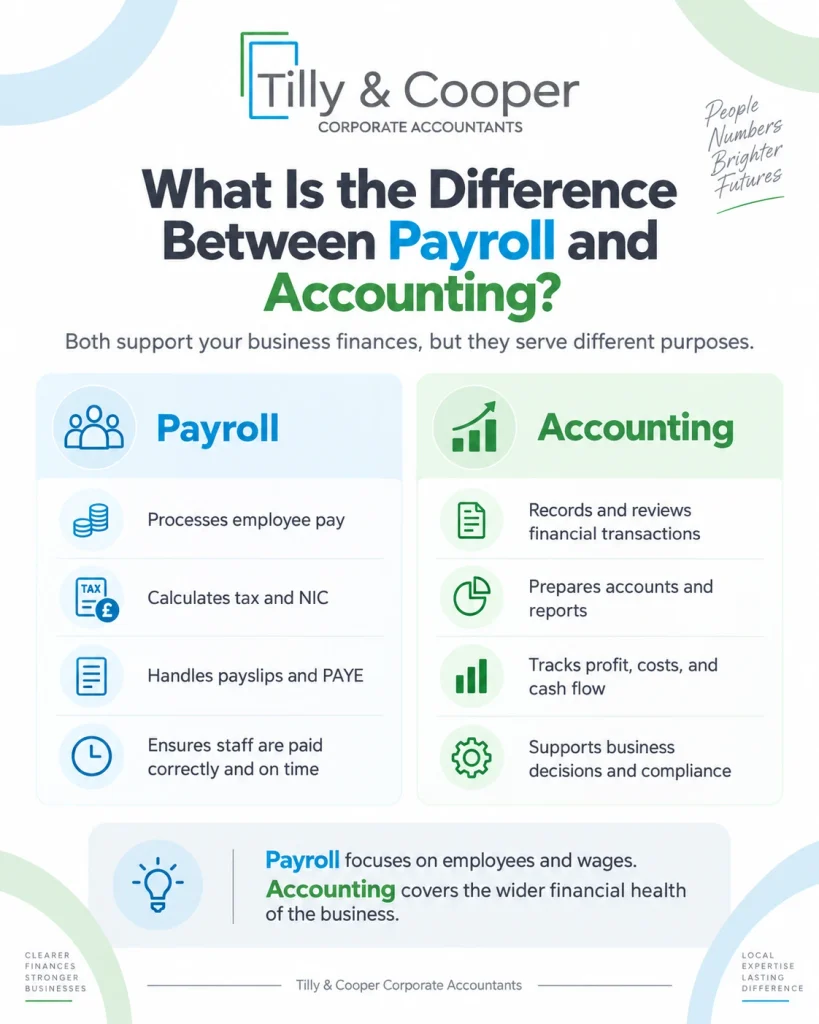
Payroll calculates and administers employee pay, while accounting records, analyses and reports the financial effect of payroll and other business activities. Payroll focuses on amounts directly connected with employees, including wages, PAYE liabilities, National Insurance contributions, pension costs, bonuses, statutory payments and the final net pay transferred to staff.
Accounting uses these payroll figures as part of the company’s wider financial records. Payroll costs may appear in the profit and loss account, while unpaid PAYE, National Insurance and pension liabilities may appear on the balance sheet. Payroll information can also affect cash-flow records, management accounts and statutory financial statements.
The two functions are therefore closely linked. It produces accurate employee payment and deduction data, while accounting incorporates that information into the business’s overall financial reporting. Accurate payroll helps ensure the company’s accounts reflect the true cost of employing staff.
What Is the Difference Between Payroll and Compensation?
Payroll is the process used to calculate and administer employee payments, while compensation describes the wider financial and non-cash rewards an employee receives for their work. Payroll mainly deals with amounts processed through the employer’s pay system, such as salary, bonuses, commission, deductions, pension contributions, and net pay. Compensation is a broader concept. It can include basic salary, performance bonuses, commission, employer pension contributions, private healthcare, company cars, share schemes, and other employee benefits.
Some of these rewards may be paid directly through payroll, while others are provided separately as benefits in kind or long-term incentives. The key difference is scope. Payroll focuses on processing and reporting employee pay, whereas compensation represents the total value of the reward package offered to an employee. Therefore, payroll can form part of compensation, but compensation can include benefits that do not appear as normal cash payments.
What Are the Most Common Payroll Mistakes?
Common payroll mistakes involve employee information, calculations, deductions, reporting, payment dates and record keeping.
Employers should watch for:
- using an incorrect tax code
- entering starter information incorrectly
- using duplicate payroll IDs
- omitting taxable payments
- calculating overtime incorrectly
- processing bonuses incorrectly
- making unauthorised deductions
- using the wrong National Insurance category
- calculating pension contributions incorrectly
- failing to process student loans correctly
- submitting an FPS late
- failing to send an EPS when required
- paying HMRC late
- issuing inaccurate payslips
- failing to process an employee leaving correctly
- maintaining incomplete payroll records
Employers should review payroll information before employee payments and HMRC reports are finalised. A regular payroll review can identify unusual movements in:
- gross wages
- net wages
- PAYE
- National Insurance
- pension contributions
- employee deductions
This reduces the risk of recurring errors.
Can You Run Payroll Without an Accountant?
Yes. A business can run payroll without an accountant if it understands its employer responsibilities and uses suitable payroll software.
Internal payroll may work well where a business has:
- few employees
- fixed salaries
- simple deductions
- reliable internal records
- sufficient payroll knowledge
However, payroll can become more complex where a business has:
- several employees
- directors on payroll
- variable working hours
- bonuses or commission
- workplace pensions
- statutory payments
- student loans
- several pay frequencies
- attachment orders
- benefits
- frequent starters and leavers
Payroll software can automate calculations, but the employer remains responsible for providing accurate information and meeting its legal obligations.
When Should You Outsource Payroll?
Outsourcing payroll can be appropriate when managing payroll internally takes too much time, increases compliance risk or requires specialist knowledge. A professional payroll provider can help businesses set up employees correctly, calculate gross and net pay, process PAYE, calculate National Insurance, manage pension contributions and student loan deductions, produce payslips and prepare FPS and EPS submissions. Payroll support can also cover payroll reports, employee starters and leavers, statutory payments and year-end payroll procedures.
Outsourcing becomes particularly useful as employee numbers increase, pay structures become more complex or internal staff no longer have enough time to manage recurring payroll duties accurately.
Tilly & Cooper can support UK businesses with payroll processing, PAYE calculations, payslips, HMRC submissions, payroll records and ongoing payroll compliance. Effective payroll outsourcing helps ensure employees receive the correct pay, deductions are calculated accurately, and HMRC reporting and payment deadlines are met.

