
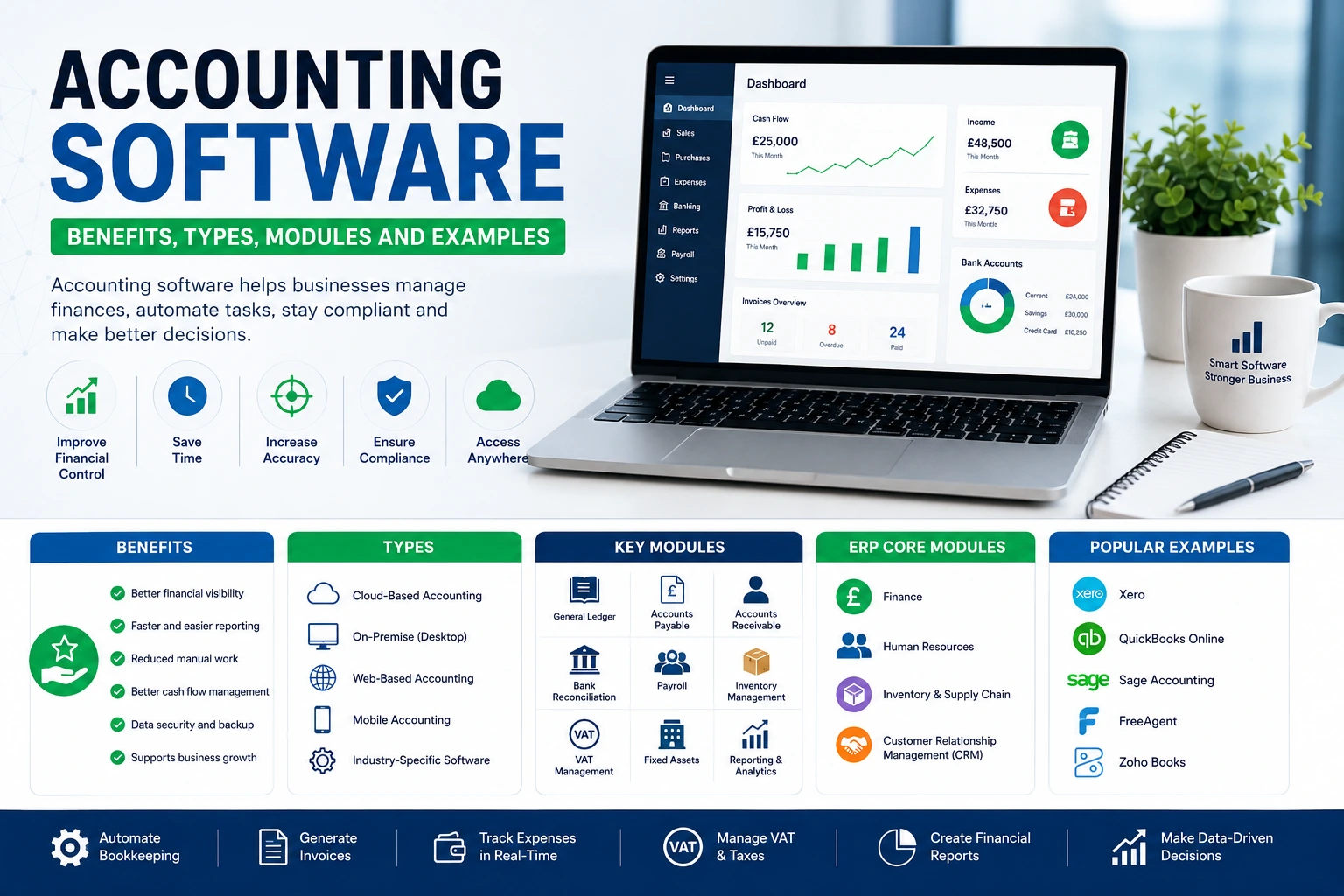
Accounting Software: Benefits, Types, Modules and Examples
Accounting software helps businesses record financial transactions, automate bookkeeping, manage VAT, create invoices, generate reports, and stay compliant with HMRC. Whether you are a sole trader or a growing company, choosing the right accounting software can save time, reduce errors, and improve financial visibility.
Today’s accounting software solutions do much more than record income and expenses. They automate bookkeeping, generate financial reports, calculate taxes, manage invoices, reconcile bank transactions, and provide real-time insights into business performance. Many businesses choose cloud accounting applications because they provide secure, remote access and make collaboration between accountants and business owners easier. This guide explains everything you need to know about accounting software, including how it works, its key features, different types, ERP integration, and the best options available for UK businesses.
What Is Accounting Software and What Does It Do?
Accounting software is a digital application that records, organises, processes, and reports financial transactions. Instead of maintaining paper records or complex spreadsheets, businesses use an accounting system to manage their finances accurately and efficiently. Modern accounting application software automates many repetitive tasks. It records sales and purchases, tracks expenses, creates invoices, calculates VAT, manages payroll, and produces financial reports with minimal manual input.
Businesses of every size rely on accounting software solutions because they improve accuracy, save time, and provide instant access to financial information. Depending on your needs, accounting software for small businesses may include only basic bookkeeping features, while larger organisations often require advanced systems that support inventory management, budgeting, payroll, and financial forecasting.
Common tasks performed by accounting software include:
- Recording income and expenses
- Managing accounts payable and receivable
- Creating professional invoices
- Bank reconciliation
- VAT calculations
- Payroll processing
- Cash flow monitoring
- Financial reporting
- Budget planning
- Audit preparation
Whether you are a freelancer, contractor, retailer, landlord, or limited company, the right bookkeeping software helps keep your financial records organised throughout the year.
How Does Accounting Software Work?
Most accounting computer programs follow the same basic process. The software collects financial information, categorises transactions, stores data securely, and generates reports automatically.
A typical workflow looks like this:
Data Entry
Transactions enter the system through:
- Bank feeds
- Manual entries
- Imported spreadsheets
- Online payment platforms
- Sales software
- Receipt scanning
Modern cloud accounting applications automatically connect to your bank account, reducing manual work significantly.
Transaction Categorisation
The software analyses each transaction and assigns it to the correct accounting category, such as:
- Sales
- Purchases
- Rent
- Utilities
- Wages
- Marketing
- Travel
- Professional fees
This makes bookkeeping faster and more accurate.
Double-Entry Accounting
Every transaction affects at least two accounts. The software automatically records both sides of the transaction, helping maintain accurate financial records.
Financial Reporting
Once data has been processed, the software generates reports including:
- Profit and Loss
- Balance Sheet
- Cash Flow Statement
- Trial Balance
- VAT reports
- Management accounts
Business owners can instantly monitor financial performance without having to manually prepare reports.
Why Is Accounting Software Important for Businesses?
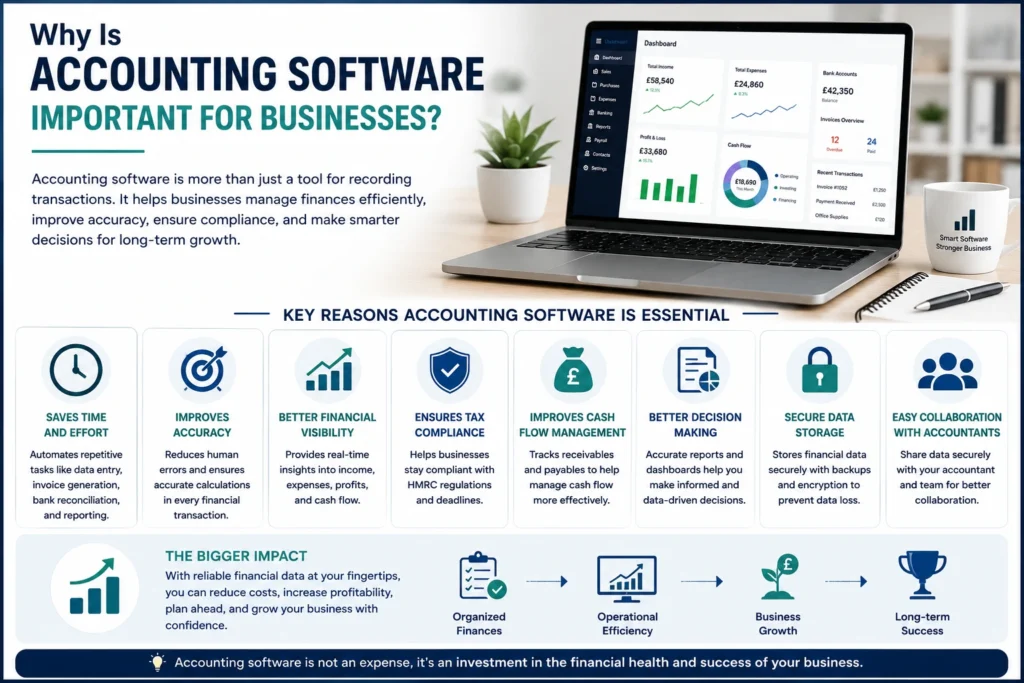
Every business needs reliable financial information to make informed decisions. An efficient accounting system provides accurate records that help owners understand profitability, cash flow, tax obligations, and future growth opportunities. Without proper accounting software, businesses often experience:
- Lost invoices
- Incorrect calculations
- Cash flow issues
- Missed tax deadlines
- Duplicate transactions
- Poor financial visibility
Using accounting software reduces these risks by automating financial processes and storing information securely. Some of the biggest benefits include:
Saves Time
Routine bookkeeping becomes much faster through automation.
Reduces Errors
Automatic calculations minimise human mistakes.
Improves Cash Flow
Businesses can quickly identify overdue invoices and outstanding payments.
Supports Better Decisions
Real-time reports help owners understand business performance immediately.
Keeps Businesses HMRC Compliant
Many UK accounting platforms include Making Tax Digital (MTD) features that simplify VAT submissions.
What Are the Key Features of Accounting Software?
The best accounting software solutions combine automation, reporting, compliance, and financial management in one platform.
Key features include:
Invoice Management
Create branded invoices, send them electronically, and monitor payment status.
Expense Tracking
Capture receipts using mobile apps and categorise expenses automatically.
Bank Reconciliation
Import transactions directly from your bank and reconcile accounts quickly.
VAT Management
Calculate VAT automatically and prepare VAT returns for HMRC.
Payroll Processing
Many accounting software platforms include payroll modules that calculate salaries, National Insurance, pension contributions, and PAYE.
Financial Reporting
Generate reports including:
- Profit and Loss
- Balance Sheet
- Cash Flow
- VAT reports
- Budget reports
- Management accounts
Inventory Management
Track stock quantities, purchase orders, suppliers, and inventory values.
Multi-user Access
Business owners, employees, and accountants can securely access the same data simultaneously.
Mobile Access
Most cloud accounting applications include mobile apps that allow users to:
- Raise invoices
- Capture receipts
- Approve expenses
- View reports
- Check cash flow
What Are the Main Modules of Accounting Software?
Most professional accounting software includes several modules that work together to manage every aspect of business finances.
General Ledger
The General Ledger forms the foundation of every accounting system. It records every financial transaction.
Accounts Payable
This module manages supplier invoices, payment schedules, and outstanding liabilities.
Accounts Receivable
Businesses use this module to:
- Raise invoices
- Track customer payments
- Send reminders
- Monitor overdue accounts
Payroll
Payroll modules calculate employee salaries while complying with tax regulations.
Fixed Assets
Track company assets including:
- Computers
- Machinery
- Vehicles
- Office equipment
The software automatically calculates depreciation.
Inventory Management
Monitor stock levels, product costs, and purchase orders.
Financial Reporting
Generate detailed reports for management, investors, lenders, and accountants.
What Are the Four Core Modules of an ERP System?
Enterprise Resource Planning (ERP) software extends traditional accounting by connecting multiple business departments into one integrated platform.
The four core ERP modules include:
Finance
Handles accounting, budgeting, reporting, tax, and compliance.
Human Resources (HR)
Manages employee records, payroll, recruitment, and performance.
Inventory and Supply Chain
Tracks purchasing, suppliers, warehouses, stock control, and logistics.
Customer Relationship Management (CRM)
Stores customer information, sales opportunities, communication history, and marketing data.
Together, these modules provide complete visibility across an organisation.
What Are Some Popular Examples of Accounting Software?
Many excellent accounting platforms are available today. The best choice depends on your business size, industry, and reporting requirements.
Popular examples include:
| Software | Best For |
| Xero | Small and growing businesses |
| QuickBooks Online | SMEs and freelancers |
| Sage Accounting | UK businesses |
| FreeAgent | Contractors and freelancers |
| FreshBooks | Service-based businesses |
| Zoho Books | Growing companies |
| KashFlow | UK SMEs |
| Oracle NetSuite | Large enterprises |
| Microsoft Dynamics 365 | Medium and large organisations |
| SAP Business One | Manufacturing and wholesale businesses |
Each platform offers different features, pricing, and integrations. Businesses should compare their requirements before choosing an accounting software solution.
What Are the Different Types of Accounting Software?
Not every business requires the same type of accounting application software.
The most common categories include:
Cloud Accounting Software
Cloud systems operate online through secure internet connections.
Benefits include:
- Automatic updates
- Anywhere access
- Secure backups
- Real-time collaboration
- Mobile apps
Examples include Xero, QuickBooks Online, and FreeAgent.
Desktop Accounting Software
Installed directly on a computer. Suitable for businesses that prefer local storage but offers less flexibility than cloud solutions.
Enterprise Accounting Software
Designed for larger organisations with complex reporting, multiple departments, and international operations.
Industry-Specific Software
Some accounting software for construction, healthcare, charities, manufacturing, and hospitality includes specialised features tailored to those industries.
Custom Accounting Software
Large organisations sometimes build bespoke systems to meet unique operational requirements.
What Are the Advantages and Disadvantages of Accounting Software?
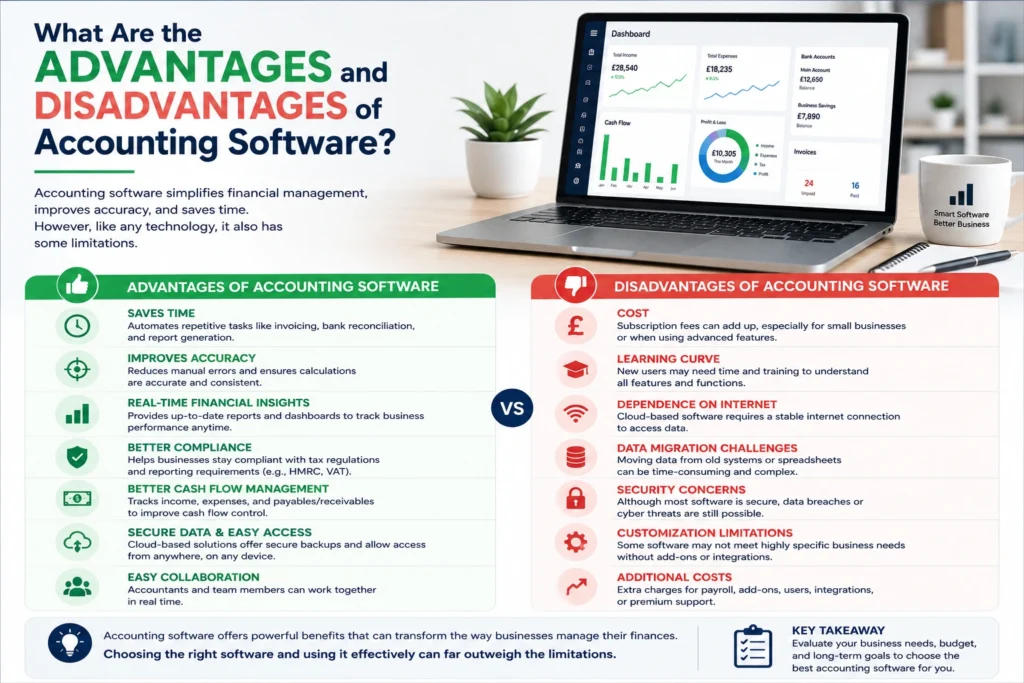
Like any business tool, accounting software offers significant benefits, but it also has a few limitations. Understanding both helps businesses choose the right solution.
Advantages of Accounting Software
Saves Valuable Time
Automation reduces the time spent on repetitive bookkeeping tasks. Businesses can create invoices, reconcile bank transactions, and generate reports within minutes.
Improves Accuracy
Manual calculations often lead to errors. Modern accounting software solutions calculate totals, VAT, payroll, and financial reports automatically, reducing the risk of costly mistakes.
Real-Time Financial Insights
Business owners can view up-to-date financial information whenever they need it. This helps them make informed decisions based on accurate data.
Simplifies Tax Compliance
Many UK accounting platforms support Making Tax Digital (MTD). They help businesses prepare and submit VAT returns directly to HMRC.
Better Cash Flow Management
Businesses can monitor outstanding invoices, track supplier payments, and identify cash flow issues before they become serious.
Secure Data Storage
Most cloud accounting applications store data on secure servers with automatic backups, reducing the risk of losing important financial information.
Easy Collaboration
Business owners and accountants can access the same records from different locations. This improves communication and speeds up year-end accounting.
Disadvantages of Accounting Software
Although the benefits usually outweigh the drawbacks, businesses should also consider the following:
- Monthly subscription costs
- Learning curve for new users
- Dependence on internet access for cloud-based systems
- Data migration when changing software
- Advanced features may require higher-priced plans
With proper training and professional support, these challenges are usually easy to overcome.
How Can Accounting Software Benefit a Business?
An effective accounting system supports almost every area of a business. It improves efficiency, increases financial visibility, and reduces administrative work.
Some of the biggest business benefits include:
Better Financial Control
Owners can monitor income, expenses, profits, and liabilities from one dashboard.
Faster Decision-Making
Real-time reports allow managers to respond quickly to financial trends and changing market conditions.
Improved Customer Service
Businesses can send invoices immediately, track payments, and resolve billing issues faster.
Easier Budgeting
Historical financial data helps businesses prepare realistic budgets and forecast future growth.
Supports Business Growth
As companies expand, modern accounting software grows with them by adding users, departments, currencies, and integrations.
Reduces Administrative Costs
Automation means fewer hours spent on manual bookkeeping, allowing staff to focus on more valuable tasks.
What Is the Difference Between Accounting Software and ERP Software?
Many people confuse accounting software with Enterprise Resource Planning (ERP) software. While both manage financial information, they serve different purposes.
| Accounting Software | ERP Software |
| Focuses mainly on finance | Manages the entire business |
| Records financial transactions | Integrates multiple departments |
| Suitable for small and medium businesses | Designed for larger organisations |
| Includes bookkeeping, VAT, payroll, and reporting | Includes accounting, HR, inventory, manufacturing, CRM, procurement, and logistics |
| Lower implementation cost | Higher investment and complexity |
Many businesses start with standalone bookkeeping software and later upgrade to an ERP solution as they grow.
Which Accounting Software Do Professional Bookkeepers Use?
Professional bookkeepers choose software based on their clients’ needs, industry, and reporting requirements.
The most widely used platforms include:
- Xero
- QuickBooks Online
- Sage Accounting
- FreeAgent
- KashFlow
- Zoho Books
These platforms provide efficient bookkeeping, bank reconciliation, VAT reporting, payroll integration, and financial reporting. Many accountants also use dedicated accounts production software for accountants to prepare statutory accounts and corporation tax returns. These systems integrate with bookkeeping software, making year-end compliance much easier.
What Is the Best Accounting Software for Small Businesses in the UK?
The best accounting software for small businesses depends on business size, industry, and budget.
Here are some popular options:
Xero
Ideal for growing businesses that need bank feeds, payroll integration, inventory management, and excellent reporting.
QuickBooks Online
Suitable for freelancers, contractors, consultants, and small companies looking for an easy-to-use platform.
Sage Accounting
A trusted UK solution offering payroll, VAT submissions, invoicing, and financial reporting.
FreeAgent
Designed for freelancers, contractors, landlords, and small business owners.
KashFlow
Developed specifically for UK businesses with strong VAT and payroll features. Choosing the right solution depends on your business goals, reporting needs, and expected growth.
Is Accounting Software a Part of an ERP System?
Yes. Accounting is usually one of the core modules within an ERP system. While standalone accounting application software focuses only on finance, ERP software combines accounting with:
- Human Resources
- Inventory
- Procurement
- Manufacturing
- CRM
- Sales
- Purchasing
- Supply Chain Management
Businesses that require complete operational visibility often choose ERP software.
Is QuickBooks an ERP System or a CRM Platform?
QuickBooks is neither a full ERP system nor a dedicated CRM platform.It is primarily accounting software designed for small and medium-sized businesses.
QuickBooks includes:
- Bookkeeping
- Invoicing
- Expense tracking
- VAT management
- Payroll
- Financial reporting
Although QuickBooks integrates with ERP and CRM applications, it is best described as a cloud accounting platform.
Is Xero Considered an ERP System?
No. Xero is a leading cloud accounting software platform rather than a complete ERP solution.
It focuses on:
- Bookkeeping
- Invoicing
- Payroll
- VAT
- Bank reconciliation
- Financial reporting
However, Xero connects with hundreds of third-party applications that extend its functionality into inventory management, CRM, project management, and e-commerce.
What Are the Top Three Accounting Software Platforms?
Although many excellent products exist, the three most popular platforms are:
1. Xero
Excellent for growing businesses and accountants.
2. QuickBooks Online
Ideal for freelancers, consultants, and SMEs.
3. Sage Accounting
A trusted choice for UK businesses requiring strong payroll and compliance features.Each offers secure cloud access, automation, and HMRC-compatible reporting.
Why Should Businesses Use Accounting Software?
Businesses use accounting software because it helps them work smarter rather than harder.
It enables organisations to:
- Reduce paperwork
- Improve financial accuracy
- Save time
- Monitor cash flow
- Prepare tax returns
- Generate management reports
- Improve budgeting
- Track business performance
- Maintain compliance with HMRC
As businesses grow, these benefits become even more valuable.
Which Accounting Software Is Most Commonly Used in the UK?
Several accounting software solutions dominate the UK market.
The most commonly used include:
- Xero
- QuickBooks Online
- Sage Accounting
- FreeAgent
- KashFlow
Many accountants recommend these platforms because they support Making Tax Digital, automate bookkeeping, and integrate with UK banking systems.
How Does Accounting Software Make Auditing Easier?
Preparing for an audit becomes much simpler when businesses use modern accounting software.
Benefits include:
- Complete transaction history
- Automatic audit trails
- Digital document storage
- Easy report generation
- Bank reconciliation records
- VAT summaries
- User activity logs
Auditors can review organised financial information more efficiently, reducing both time and costs.
Which Accounting Software Is Compatible With HMRC?
HMRC recognises many software providers for Making Tax Digital (MTD). Popular compatible solutions include:
- Xero
- QuickBooks Online
- Sage Accounting
- FreeAgent
- KashFlow
- Zoho Books
These platforms allow businesses to submit VAT returns digitally while maintaining accurate accounting records.
What Is Cloud-Based Accounting Software and How Does It Work?
Cloud-based accounting software operates entirely online. Instead of installing software on a single computer, users access their financial information securely through a web browser or mobile application.
Cloud accounting offers several advantages:
- Automatic software updates
- Secure online backups
- Real-time collaboration
- Access from any location
- Bank feed integration
- Multi-device support
- Enhanced data security
This flexibility makes cloud accounting applications the preferred choice for many modern businesses.
FAQs
Can small businesses use accounting software?
Yes. Many platforms are designed specifically for sole traders, freelancers, and small companies.
Do I still need an accountant?
Yes. Software automates bookkeeping, but accountants provide valuable advice on tax planning, compliance, business growth, and financial strategy.
Is cloud accounting secure?
Reputable providers use encryption, multi-factor authentication, and regular backups to protect financial data.
Can accounting software handle payroll?
Many platforms include payroll modules or integrate with dedicated payroll software.
Can accounting software connect to my bank?
Yes. Most modern accounting platforms automatically import bank transactions using secure bank feeds.
Conclusion
Investing in the right accounting software is about more than simplifying bookkeeping. It helps improve financial control, supports better business decisions, enhances tax compliance, and provides real-time visibility over your finances. Whether you are starting a new business or upgrading your existing accounting system, choosing software that meets your current and future needs is essential. Whether you need basic bookkeeping software, advanced accounting software solutions, or scalable cloud accounting applications, selecting the right platform can save time, reduce costs, and support long-term business growth.
At Tilly and Cooper, we help businesses choose, implement, and manage the right accounting software for their needs. Our experienced accountants provide expert bookkeeping, VAT, payroll, year-end accounts, tax planning, and ongoing financial support, allowing you to focus on growing your business with confidence.

